My current project · In development
 REWIND
A Windows instant-replay recorder I’m building after unreliable clips and recording overhead interrupted sessions with friends. The goal is quick clips, efficient storage, and a small interface that stays out of the way.
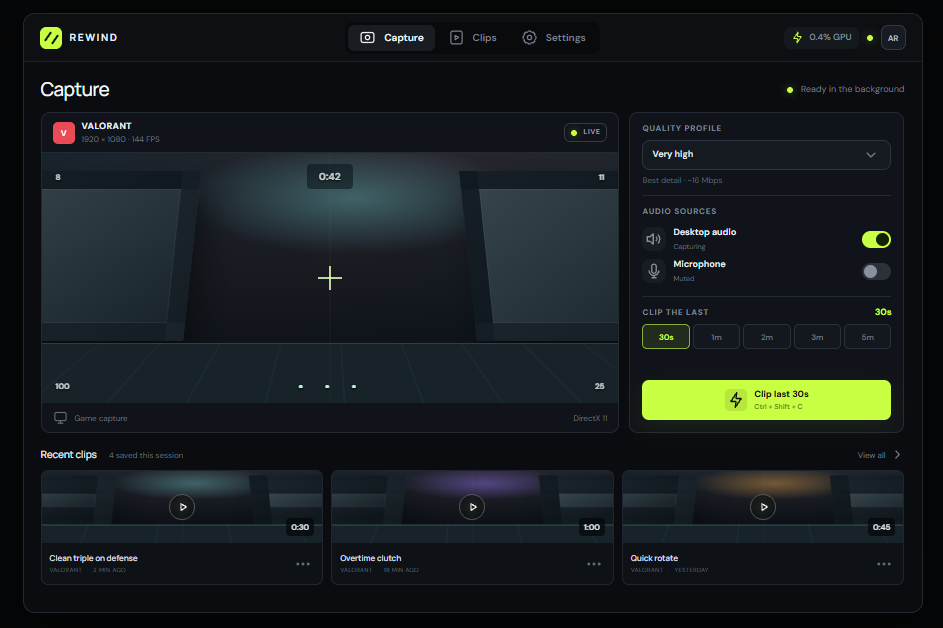
UI in development. The native sidebar and capture engine are being developed alongside this interface.
What I’m building
| Area | Current prototype | Remaining scope |
|---|---|---|
| Replay | 1–300 second encoded memory buffer; background MP4 saving. | Reliable long sessions and recovery from interrupted saves. |
| Audio & quality | Desktop and microphone controls, input selection, four quality profiles. | Device reconnect and audio-sync testing; optional encoded quality preview. |
| Interface | Alt+Z sidebar, tray controls, clip playback and Open folder. Playback and UI polling stop when hidden. | Fullscreen integration, live GPU readout, startup preference, installer conflict checks, and game folders. |
| Compatibility | Windows 10 development setup, RTX 2070 Super, 1080p SDR. | Windows 11, other GPUs, HDR, and broader compatibility testing. |
Quality profiles and saving
Experimental targets are High at 1080p60 / 24 Mbps, Medium at 1080p60 / 14 Mbps, Standard at 720p60 / 8 Mbps, and Extreme at 720p30 / 3 Mbps. Variable bitrate changes actual file size. The replay buffer has a 768 MB ceiling, which can shorten retained history.
Clips currently go to Videos/REWIND. Saving remuxes encoded fragments, checks the output, and renames the finished MP4. Manual full-file decoding is available; automatic deferred checks and interrupted-file recovery remain in scope.
Capture architecture
The regular prototype uses ScreenRecorderLib and Media Foundation. Separate experiments use DXGI Desktop Duplication, D3D11 textures, and NVENC to encode into the replay buffer. Saving remuxes the encoded media without re-encoding it.
The dev.9 source moves acquisition into a dedicated producer with an eight-slot atomic frame handoff. Leased GPU surfaces stay protected while encoding. Busy queues replace unread frames, and an exhausted surface pool skips work. Counters track those events so performance can be assessed alongside recording quality.
Benchmarks and capture experiments
Testing used a 1080p real-time 3D workload exercising both CPU and GPU. GPU utilization reached 98% in recorded runs, indicating a GPU-heavy configuration with little headroom. CPU scheduling and presentation can still affect frame times.
FPS values were recorded manually during development. The pipeline experiments targeted 1080p60 video without audio. These runs span builds; cadence, source duplication, and settings limit direct comparison. Dev.8’s saved sample averaged 58.71 FPS and its source repeated frames.
| Build | Capture only | Recording | Finding |
|---|---|---|---|
| dev.3 | — | 185 FPS | Initial Desktop Duplication investigation. |
| dev.6 | 192 FPS | 190 FPS | CPU affinity showed no demonstrated gain. Timestamp errors invalidated the capture-only comparison. |
| dev.7 | 192 FPS | 188 FPS | Timestamp handling corrected; recording cadence warning remained. |
| dev.8 | 194 FPS | 192 FPS | Fewer copies and pooled GPU surfaces; substantial source duplication requires further work. |
| dev.9 source | Pending | Pending | Dedicated producer and bounded atomic frame handoff; live validation remains. |
CPU, memory, and encoded output from the dev.5 pair
Scale 0–2% CPU. The direct path’s working set was higher, as shown below.
| Metric | Original path | Direct NVENC |
|---|---|---|
| CPU | 1.76% | 0.14% |
| Working set | 458 MiB | 501 MiB |
| Private commit | 969 MiB | 604 MiB |
| Output bitrate | 11.07 Mbps | 11.13 Mbps |
CPU is normalized across 12 logical processors. Summed working sets can count shared pages twice. Private commit differs from resident RAM.
Bugs and findings
| Issue | What testing found / current response |
|---|---|
| Fullscreen focus loss | Opening the overlay minimized the fullscreen application. Borderless mode worked in testing; exclusive-fullscreen integration remains open. |
| Capture overhead | A Windows Graphics Capture run reached 182 FPS. Desktop Duplication and NVENC experiments improved reported FPS, with frame freshness still under investigation. |
| Worker failure | Early NVENC runs exited before completion. Later paired runs completed; failed runs are excluded from performance claims. |
| Invalid timestamps | Capture-only output reported non-monotonic DTS. Filter timestamps and passthrough output corrected the reproduced collision; reports now reject timestamp failures. |
| Uneven / repeated frames | Saved samples exposed cadence gaps. Dev.8 counted roughly 3,500 GPU copies and 3,600 repeated source frames per two-minute run. New queue counters expose replacement, stale frames, and pool pressure. |
| Conversion failure | A GPU NV12 conversion trial failed to create a texture. It was excluded from the capture pipeline. |
| Metadata in clip folders | New JSON metadata moved to app data so the Videos library contains the clips. |
| Corruption & freezes | Output checks and full decoding exercise saved files. Crash recovery, device-loss handling, and native fault containment still need integration testing. |
Verification so far
- Generated GPU video passed NVENC encoding, replay buffering, saving, and full decoding with all 180 frames and uneven timestamps preserved.
- Synthetic checks passed for partial MP4 writes, malformed input, history bounds, audio/video remuxing, cadence warnings, and affinity restoration.
- Native queue stress testing passed with 500,000 concurrent publications, protected read leases, replacement, cancellation, and ordered consumption.
Synthetic tests exercise generated media. Live game capture, audio synchronization, and cross-system reliability need separate validation.
Technical references
Microsoft Desktop Duplication API · NVIDIA NVENC programming guide